Home & office
Good signal, slow Wi-Fi, or a busy channel
Full Wi-Fi bars and a call still breaks up. Find out whether the delay is on the Wi-Fi link, on a channel shared with nearby networks, or beyond your router.
Updated
The short answer: full bars only mean the phone can hear the router. Test where and when it feels slow, and nOversight shows whether the delay is on the Wi-Fi, on a channel shared with the neighbours, or beyond your router.
The situation
A video call freezes at the kitchen table. A film stalls on the sofa, two metres from the router. The bars are full, so the Wi-Fi gets the blame last.

The bars say nothing about how often the phone resends data, how much of the channel your neighbours use, or how long your router and provider take to answer. Any of those can make a strong connection feel slow.
Three steps
1. Test where and when it happens
Set up the Shortcut, press Play and stay where the problem happens, at the time it usually happens (in flats, evenings are often busier). Then take a second reading where the Wi-Fi works well, to compare.
The free app stops after 60 seconds of live readings, enough for a first look. Basic removes the limit; keeping the session and adding diagnostic detail needs Pro. On a Mac, Basic watches the Mac’s own connection without a phone.
2. Read the live readings
The phone reports signal strength, link rate, channel, Wi-Fi standard, noise, signal-to-noise ratio and each change of access point.
Link rate is the speed the phone and access point have agreed for the next transmission, not the speed you get: retries or a busy channel can still slow you down. A link rate that keeps falling while the signal stays strong means the link is struggling for another reason; the signal-to-noise ratio shows whether noise is part of it.
With Orb speed tests on, the phone runs tests as conditions change, and nOversight shows delay to your router separately from delay to the internet (on a Mac you can start a test yourself). If the router answers quickly and the internet doesn’t, the Wi-Fi isn’t the main suspect.
3. Check how busy the channel is
Your Wi-Fi shares its channel with every network on it, such as the flat next door, so your phone may have to wait its turn even with a strong signal. Radio noise from equipment that isn’t Wi-Fi can keep the channel busy too.
iPhone live readings can’t show this. iOS records channel busyness and retries in its diagnostic logs, so take a sysdiagnose on the same phone straight after your test and import it (Pro). On a Mac, Basic shows them live for the Mac or a connected iPhone.
The evidence
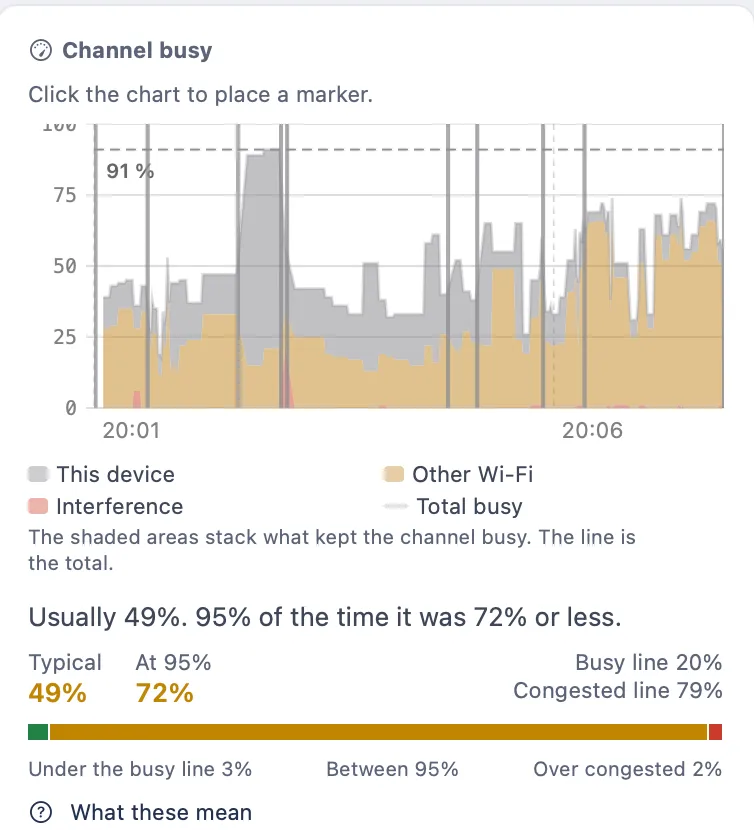
Other Wi-Fi is airtime used by other Wi-Fi devices: other phones and laptops on your own network as well as nearby networks. Interference is energy the chip couldn’t decode as Wi-Fi. This device is your own traffic, which climbs when you stream or run a speed test.
This is the channel as your device saw it. nOversight isn’t a spectrum analyser, can’t name the source of interference and never changes your router’s settings.
What it means
| What you see | Possible explanation | What to check next |
|---|---|---|
| Strong signal and high link rate, router answers quickly but the internet is slow | The internet path may contribute | Compare router and internet delay; test on a wired computer |
| Other Wi-Fi fills the channel when it’s slow | Other devices on your network, or nearby networks, share your channel | Retest at a quieter hour; try a less crowded channel or 5 GHz |
| Interference rises at particular times | A nearby source that isn’t Wi-Fi | Note what was running and retest with it off |
| Retries climb, signal and channel normal | Something specific to this device or spot | Test a second device there |
| Retries rise as the signal falls | Weak coverage may contribute | Find the edge of coverage |
What to do next
Change one thing at a time (channel, band or router position), then retest from the same spot, with the same device, at a similar time of day. A test at 10 a.m. says little about a problem at 9 p.m.
The phone and Mac apps are licensed separately: see pricing.